
CIBC APPOINTS ANTIGUAN AS LOANS AND MORTGAGE MANAGER

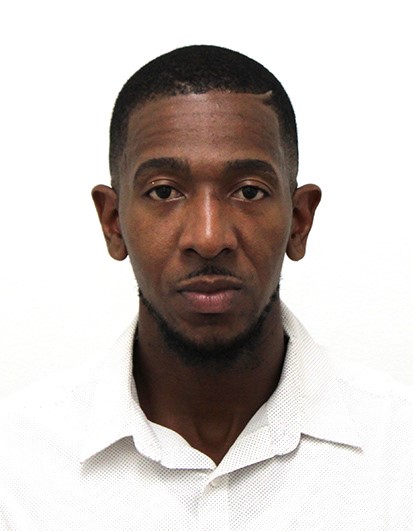
CIBC Caribbean is proud to announce the appointment of Mali Newton, to the post of Manager, Loans and Mortgage Centre in Antigua effective August 2024.
The bank’s Country Head, Ladesa James-Williams said his appointment will further enhance the bank’s service to its clients.
“We are delighted to have Mali, a seasoned banking professional join our team and know he will work assiduously towards the benefit of our staff, clients and community at large”.
A native of Antigua and Barbuda, Mali previously, worked at the Eastern Caribbean Central Bank as an Examiner from January 2021 to May 2024 and spent nearly ten years at Scotiabank Antigua in various capacities, including Teller, Personal Banking Assistant and Customer Relations Representative.

A qualified banker, Mali earned his BBA in Finance (Magna Cum Laude) from Midwestern State University in 2015 and later obtained an MSc in Corporate Finance from the University of the West Indies, Mona in 2021.
His experience includes roles as an Advisor at Sagicor Life (Eastern Caribbean) Inc. in Antigua and as an Investment Officer at MoneyMasters Limited in Kingston, Jamaica.
A passionate sports enthusiast, Mali enjoys basketball, gym workouts, and hiking, participating in various sporting leagues in Antigua and Barbuda and beyond. He is dedicated to supporting CIBC Caribbean’s goals and serving the community in Antigua and Barbuda.
He said he was happy to be back home. “I am grateful for the opportunity to join the CIBC team in Antigua as the Manager, Loan and Mortgages. I am not only excited about my appointment but also fully committed to diligently fulfilling my responsibilities and contributing to our clients’ success. I look forward to making a positive impact and working alongside such a dedicated group of professionals.”
This story was first published by Antigua News on : antigua.news/2024/08/12/cibc-appoints-antiguan-as-loans-and-mortgage-manager. © 2024 Antigua News. Republication without permission is not allowed.

About the author
The Editorial Staff refers to all reporters employed by Antigua.news. When an article is not an original creation of Antigua.news—such as when it is based on a press release, other media articles, letters to the editor, or court decisions—one of our staff members is responsible for overseeing its publication.
Read our editorial standards and corrections policy. Spotted an error? Contact the newsroom.
More from Antigua and Barbuda
View section
Scottish Bagpipers and Caribbean Steelpan Musicians to Unite for One Commonwealth Night
A unique musical collaboration featuring Scottish bagpipers, Caribbean steelpan performers and an orchestra will highlight cultural unity during the November 2 celebration in Antigua and Barbuda.
By Cory Wayland

Antigua and Barbuda and Panama Sign Air Services Agreement
New aviation agreement opens opportunities for expanded air travel, tourism and trade between Antigua and Barbuda, Panama and destinations across Central and South America.
By Shermain Bique-Charles

Antigua and Barbuda Records 12 Heatwaves in 2026 as Hotter and Drier Conditions Loom
Climatologist Orvin Paige warns that rising temperatures, prolonged heatwaves and persistent drought could worsen as El Niño conditions extend into 2027.
By Cory Wayland

Sandals Grande Antigua Supervisor Earns Prestigious Hotel Management Diploma in Switzerland
Engineering and Maintenance Supervisor Ariel Joseph celebrates a major academic milestone after completing studies at Les Roches International School of Hotel Management through a Sandals Corporate University scholarship.
By Cory Wayland
Comments (4)
Abbi August 12, 2024, 12:45 PM
Bless August 12, 2024, 3:16 PM
Anonymous August 12, 2024, 5:17 PM
Jahson August 12, 2024, 6:46 PM