
Antigua and Barbuda represented at the Fifth Annual SIDS National Focal Points Network Meeting

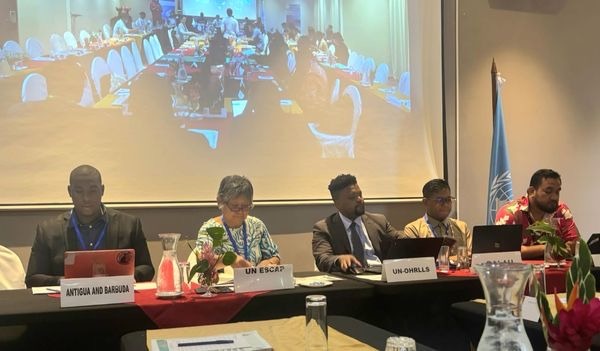
Garth Simon, Monitoring & Evaluation Associate and Project Technical Officer at the Department of Environment, represented Antigua and Barbuda at the Fifth Annual In-Person Meeting of the SIDS National Focal Points (NFP) Network, held in Vanuatu from October 14 to 16, 2024.
The meeting, convened under the theme “Coherent Implementation of the Antigua and Barbuda Agenda for SIDS (ABAS) – Strengthening the Role of the SIDS National Focal Points Network,” focused on the effective implementation of ABAS across Small Island Developing States (SIDS).
The gathering brought together key representatives from SIDS, offering an opportunity to discuss the vital components of the ABAS framework and the actions necessary for its successful implementation.
The meeting aimed to deepen understanding of the framework’s objectives, identify the challenges and opportunities faced by NFPs in applying ABAS at the national level, and strengthen partnerships between National Focal Points to drive collaborative efforts for sustainable development.
During the second day of the event, Mr. Simon delivered a presentation as part of Session 3: In-Depth Discussion on ABAS Focus Areas.
His presentation, titled “Navigating the Key Priorities of ABAS for Sustainable Development in SIDS: Focusing on the SIDS Center of Excellence and the Debt Sustainability and Investment Support Services Initiative,” addressed key issues such as the Debt Sustainability Support Service, the Oceans and Biodiversity Beyond National Jurisdiction (BBNJ) Agreement, the SIDS Center of Excellence, and digitalization in SIDS.
These discussions were linked to critical upcoming international milestones, including the High-Level Political Forum (HLPF) 2025, the revised Sustainable Development Goals (SDGs), and the Voluntary National Reviews (VNRs).
In his presentation, Mr. Simon emphasized the importance of these initiatives in driving economic resilience and sustainable progress across the SIDS region.
He underscored how strengthening areas such as the SIDS Center of Excellence and the Debt Sustainability and Investment Support Services Initiative will enhance the capacity of SIDS to navigate global challenges while building a more resilient and sustainable future.

This story was first published by Antigua News on : antigua.news/2024/10/15/antigua-and-barbuda-represented-at-the-fifth-annual-sids-national-focal-points-network-meeting. © 2024 Antigua News. Republication without permission is not allowed.

About the author
The Editorial Staff refers to all reporters employed by Antigua.news. When an article is not an original creation of Antigua.news—such as when it is based on a press release, other media articles, letters to the editor, or court decisions—one of our staff members is responsible for overseeing its publication.
Read our editorial standards and corrections policy. Spotted an error? Contact the newsroom.
More from Antigua and Barbuda
View section
US$600 Appeal Launched to Save Dog Injured in All Saints Police Shooting
Animal welfare supporters are seeking financial assistance for urgent veterinary treatment after Helen reportedly suffered a gunshot wound to her face during a police operation that left another dog dead.
By Cory Wayland

Taxi Association Removes 40 Bags of Waste During Ffryes Beach Clean-up
Members and volunteers tackle litter at Big and Little Ffryes beaches ahead of the 2026/2027 cruise season.
By Cory Wayland

Police Express Regret After Dog Fatally Shot During All Saints Search
Police say officers initially used less-lethal measures before one dog allegedly continued advancing aggressively during an early-morning operation.
By Cory Wayland

Police Seek Public Assistance in Locating Family of Child Found Alone on Belmont Main Road
Authorities are appealing to the public for urgent assistance in identifying the child and locating her parents or guardians.
By Cory Wayland
Comments
Be the first to comment.