
Total Closure of SSWH Between Pares Village and Collins Junction

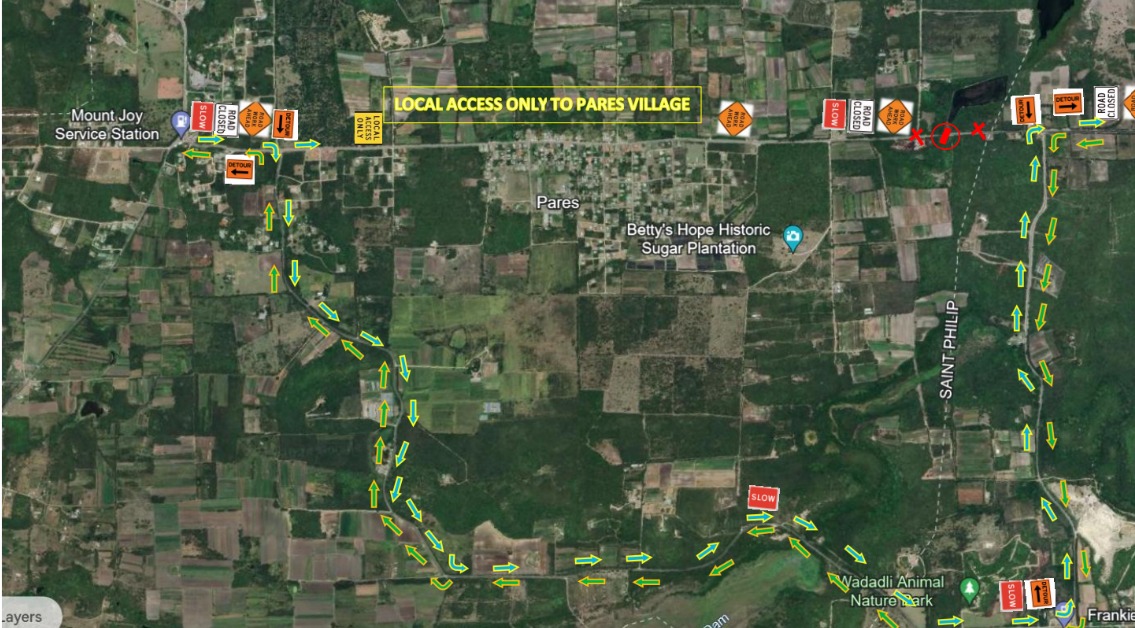
NOTICE TO STAKEHOLDERS AND THE GENERAL PUBLIC, OF THE TOTAL CLOSURE OF SSWH BETWEEN PARES VILLAGE AND COLLINS JUNCTION.
Special Notice is given that SUBJECT TO THE WEATHER, there will be a TOTAL closure of SSWH at the BIG CULVERT located between the Eastern end of Pares Village and the COLLINS Junction, commencing Monday 18th November 2024 until Monday 2nd December, 2024.
Vehicular Traffic travelling Eastwards on SSWH to Destinations beyond Pares Village, SHALL DIVERT Southwards (right), at the PotWorks Junction, pass the PotWorks Dam, then left on the Collins Road, to regain access to SSWH. PLEASE NOTE, Vehicular Traffic to Pares Village DO NOT, take this Diversion.
Vehicular Traffic travelling Westwards on SSWH from locations East of the Collins Junction, headed to Pares Village and further Westwards, SHALL DIVERT Southwards (left) at the Collins Junction and proceed via PotWorks Dam, to regain access to SSWH.
IT IS ANTICIPATED THAT THE CLOSED SECTION OF SSWH WILL REOPEN
TO SINGLE LANE TRAFFIC IN EACH DIRECTION, AFTER THE 2nd DECEMBER 2024. A further Notice will be given, later in the Month, as to when Single Lane Traffic will be allowed.
C O Williams sincerely regrets the inconvenience. The Roadwork is a part of the Second Road Infrastructure Rehabilitation Project being carried out by the Government of Antigua and Barbuda.
Stakeholders are asked to make adjustments to their travel plans to allow for delays.
Telephone Queries can be made by calling to C O Williams Project office at 562-9573.

This story was first published by Antigua News on : antigua.news/2024/11/11/total-closure-of-sswh-between-pares-village-and-collins-junction. © 2024 Antigua News. Republication without permission is not allowed.

About the author
The Editorial Staff refers to all reporters employed by Antigua.news. When an article is not an original creation of Antigua.news—such as when it is based on a press release, other media articles, letters to the editor, or court decisions—one of our staff members is responsible for overseeing its publication.
Read our editorial standards and corrections policy. Spotted an error? Contact the newsroom.
More from Antigua and Barbuda
View section
Taxi Association Removes 40 Bags of Waste During Ffryes Beach Clean-up
Members and volunteers tackle litter at Big and Little Ffryes beaches ahead of the 2026/2027 cruise season.
By Cory Wayland

Police Express Regret After Dog Fatally Shot During All Saints Search
Police say officers initially used less-lethal measures before one dog allegedly continued advancing aggressively during an early-morning operation.
By Cory Wayland

Police Seek Public Assistance in Locating Family of Child Found Alone on Belmont Main Road
Authorities are appealing to the public for urgent assistance in identifying the child and locating her parents or guardians.
By Cory Wayland
Outrage in All Saints After Police Accused of Shooting Two Chained Dogs During Search
Calls for an immediate investigation intensify after allegations that police shot two restrained dogs, killing one and leaving the other with an eye injury.
By Cory Wayland
Comments
Be the first to comment.