
Ongoing Works on Old Parham Road

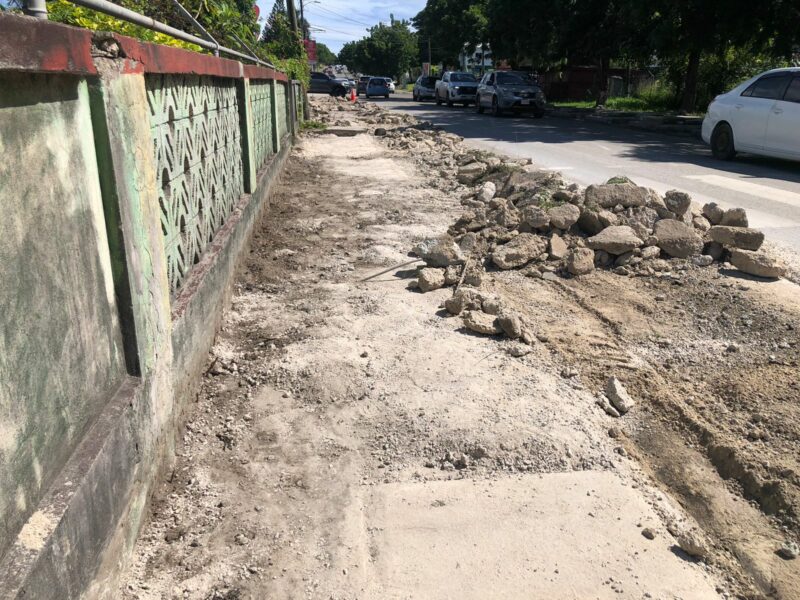
The Ministry of Works is giving notice to the general public of ongoing works on the sidewalks located on Old Parham Road, in the vicinity of Community First Co-operative Credit Union.
The public is also reminded that there will be single-lane traffic, with road works signs and flag persons employed.
Motorists and other road users are encouraged to follow all directions given to ensure cautious and safe flow of traffic, as heavy-duty equipment will be operating in the area.
Please be guided accordingly.

This story was first published by Antigua News on : antigua.news/2024/11/28/ongoing-works-on-old-parham-road. © 2024 Antigua News. Republication without permission is not allowed.

About the author
The Editorial Staff refers to all reporters employed by Antigua.news. When an article is not an original creation of Antigua.news—such as when it is based on a press release, other media articles, letters to the editor, or court decisions—one of our staff members is responsible for overseeing its publication.
Read our editorial standards and corrections policy. Spotted an error? Contact the newsroom.
More from Antigua and Barbuda
View section
LETTER: More Than a Number: What the Class of 2026 Tells Us
Professor C. Justin Robinson reflects on UWI Five Islands’ largest graduating class, its pioneering achievements and the need to bring more men into higher education.
By Shermain Bique-Charles

Idris Elba and Senator Jamilla Kirwan to Headline One Commonwealth Night as Hosts
Star-studded cultural celebration at Sir Vivian Richards Stadium will bring together international talent and local performers during CHOGM 2026.
By Cory Wayland

Regional Troops Arrive in Antigua and Barbuda to Strengthen CHOGM Security Preparations
Cayman Islands Regiment personnel join a regional military effort to support security, logistics and event operations ahead of the November summit.
By Cory Wayland

Police Outpost and Management Office Approved for Pelican Court
Cabinet establishes dedicated arrangements for security, maintenance and community concerns at the housing development.
By Shermain Bique-Charles
Comments
Be the first to comment.