
ABRSC Expresses Gratitude to the Ministry of Education and Celebrates Africa-CARICOM Day 2024 Success

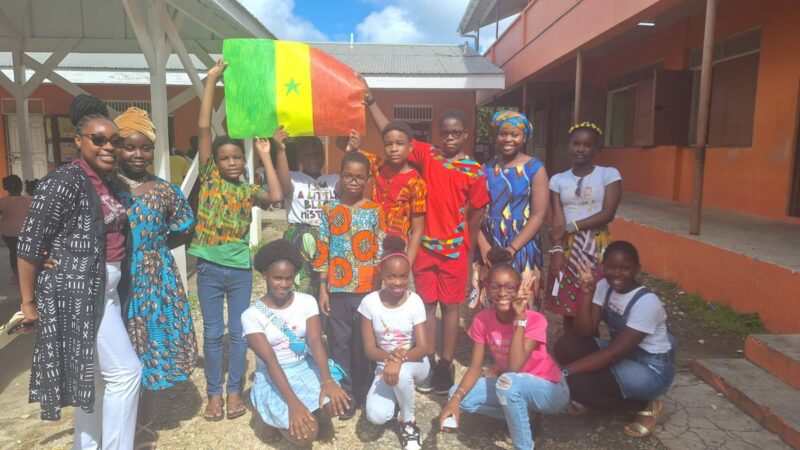
The Antigua Barbuda Reparations Support Commission (ABRSC) extends heartfelt thanks to the Ministry of Education, Sports, and Creative Industries (MoESCI) for its unwavering support and collaboration in celebrating Africa-CARICOM Day 2024.
During a brief ceremony, H.E. Anthony Liverpool, Vice Chair of the ABRSC, presented plaques to Mr. Philip Lloyd, Education Officer at MoESCI, as a token of appreciation for the Ministry’s instrumental partnership in this year’s observance.
The plaques, generously sponsored by Community First Credit Union, were also awarded to the eleven participating schools that brought the celebration to life on September 27, 2024.
Schools across Antigua and Barbuda, including The Princess Margaret, Glanville’s, Pares, All Saints, and Jennings Secondary Schools, along with Irene B. Williams, Better Chance, Mary E. Pigott, Freetown, Pares, and Christian Union Primary Schools, showcased vibrant, informative, and creative displays highlighting the rich cultural heritage of Africa and the Caribbean.
This year’s celebration spotlighted several African and Caribbean nations, including Benin, Senegal, Haiti, Ethiopia, and Nigeria. The exhibits showcased fascinating details about each country’s geographical location, capital, population, national languages, political leadership, cuisine, music, cultural traditions, national flags, mottos, and anthems.
The effort and creativity exhibited by students, teachers, and principals demonstrated a remarkable commitment to educating the public and fostering cultural pride.

Ambassador Liverpool commended the dedication and ingenuity of all involved, stating:
“The active participation of our schools speaks volumes about their enthusiasm and dedication to promoting the shared history and heritage between Africa and the Caribbean. The Commission is truly impressed by the vibrant and meaningful presentations that each school prepared. These efforts not only honor our ancestors but inspire future generations to embrace their identity with pride.”
Ambassador Liverpool also expressed gratitude to Community First Credit Union for its steadfast partnership and generous support, which made these recognitions possible. He emphasized the importance of community collaboration in preserving and promoting the Caribbean and African heritage.
The Africa-CARICOM Day program, originally piloted in Jamaica, is part of a regional initiative to bridge historical gaps and dispel misconceptions about Africa, fostering a deeper understanding of its connection to the Caribbean.
As the curtains close on this year’s celebration, the ABRSC eagerly looks forward to even greater participation and engagement in Africa-CARICOM Day 2025. The Commission remains committed to working with schools, the Ministry of Education, and community partners to ensure the continued success of this vital cultural observance.
This story was first published by Antigua News on : antigua.news/2024/12/15/abrsc-expresses-gratitude-to-the-ministry-of-education-and-celebrates-africa-caricom-day-2024-success. © 2024 Antigua News. Republication without permission is not allowed.

About the author
The Editorial Staff refers to all reporters employed by Antigua.news. When an article is not an original creation of Antigua.news—such as when it is based on a press release, other media articles, letters to the editor, or court decisions—one of our staff members is responsible for overseeing its publication.
Read our editorial standards and corrections policy. Spotted an error? Contact the newsroom.
More from Antigua and Barbuda
View section
LETTER: More Than a Number: What the Class of 2026 Tells Us
Professor C. Justin Robinson reflects on UWI Five Islands’ largest graduating class, its pioneering achievements and the need to bring more men into higher education.
By Shermain Bique-Charles

Idris Elba and Senator Jamilla Kirwan to Headline One Commonwealth Night as Hosts
Star-studded cultural celebration at Sir Vivian Richards Stadium will bring together international talent and local performers during CHOGM 2026.
By Cory Wayland

Regional Troops Arrive in Antigua and Barbuda to Strengthen CHOGM Security Preparations
Cayman Islands Regiment personnel join a regional military effort to support security, logistics and event operations ahead of the November summit.
By Cory Wayland

Police Outpost and Management Office Approved for Pelican Court
Cabinet establishes dedicated arrangements for security, maintenance and community concerns at the housing development.
By Shermain Bique-Charles
Comments (1)
Andra george December 15, 2024, 11:40 AM