
First Community Emergency Response Command Centre opens

Press Statement
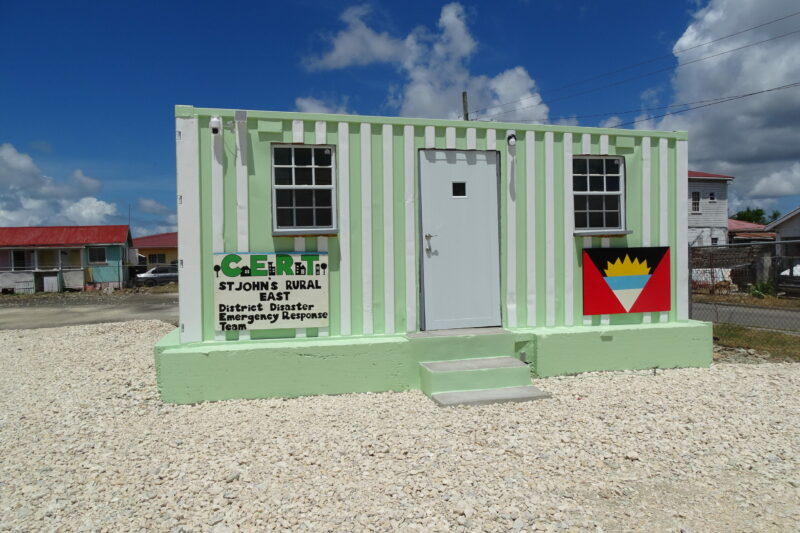
One disaster district is boasting the first ever community emergency response command centre in Antigua and Barbuda to better provide the services required for the management of disasters at the community level.
The facility, located on Hawkins Drive in Cassada Gardens in the St. John’s Rural East District, was opened Thursday evening during a ceremony.
The structure is a 20-foot container that has been retrofitted with bathroom facilities and has a small office space, equipped with cameras for security purposes.
District Disaster Coordinator (DDC) for St. John’s Rural East John Dunnah leads a team of 20 volunteers who, with the support of several individuals and businesses in the district, worked tirelessly to have the command centre completed. Dunnah is confident the structure will be able to withstand hurricane-force winds due to the effort put in to strengthen its base. He is hoping emergency command centres can be erected in other districts.
Parliamentary Representative for St. John’s Rural East Hon. Maria Browne was grateful for the efforts of businesses and individuals who supported the initiative.
Former Director of the National Office of Disaster Services (NODS) Philmore Mullin was instrumental in providing the container for the centre before retiring. He says such facilities allow for ease of co-ordination at the district level thus ensuring that the recovery process takes place quickly. NODS Director Sherrod James says communities need to be more resilient by working together.
The St. John’s Rural East Emergency Command Centre was blessed by Pastor Steven Andrew of the St. John’s Pentecostal House of Restoration.

This story was first published by Antigua News on : antigua.news/2023/06/23/first-community-emergency-response-command-centre-opens. © 2023 Antigua News. Republication without permission is not allowed.

About the author
The Editorial Staff refers to all reporters employed by Antigua.news. When an article is not an original creation of Antigua.news—such as when it is based on a press release, other media articles, letters to the editor, or court decisions—one of our staff members is responsible for overseeing its publication.
Read our editorial standards and corrections policy. Spotted an error? Contact the newsroom.
More from Antigua and Barbuda
View section
Nicholas Leads APUA Delegation to Regional Water Conference
Discussions in Grenada focus on water security, climate resilience and sustainable utility services across the Caribbean.
By Shermain Bique-Charles

Antigua and Barbuda to Host Caribbean Tourism Conference in 2027
Regional tourism leaders will gather from October 4–8 as the destination prepares to host CTO’s flagship industry forum.
By Shermain Bique-Charles

National Health Insurance Could Become Reality by 2028 as Antigua and Barbuda Relaunches Universal Health Coverage Programme
Government advances plans for a National Health Insurance Programme aimed at making essential healthcare more accessible and affordable while reducing the financial burden on households.
By Cory Wayland

WATCH:Appeal for Information After Alleged Attempt to Snatch Necklace on All Saints Road
Circulating appeal says a man’s necklace broke and fell to the ground during the incident near the credit union.
By Shermain Bique-Charles
Comments
Be the first to comment.