
UNESCO Donates 50 Robotic STEM Kits to Antigua and Barbuda’s Education Ministry to Boost Innovation in Schools

Science and technology are driving unprecedented global change. The role of science, technology, engineering, and mathematics (STEM) education has never been more crucial.
In this context, STEM education is vital for the sustainable development of Small Island Developing States like Antigua and Barbuda.
The Ministry of Education, Sports, and the Creative Industries is committed to fostering collaboration across a broad network of institutions as it charts a path towards educational innovation.
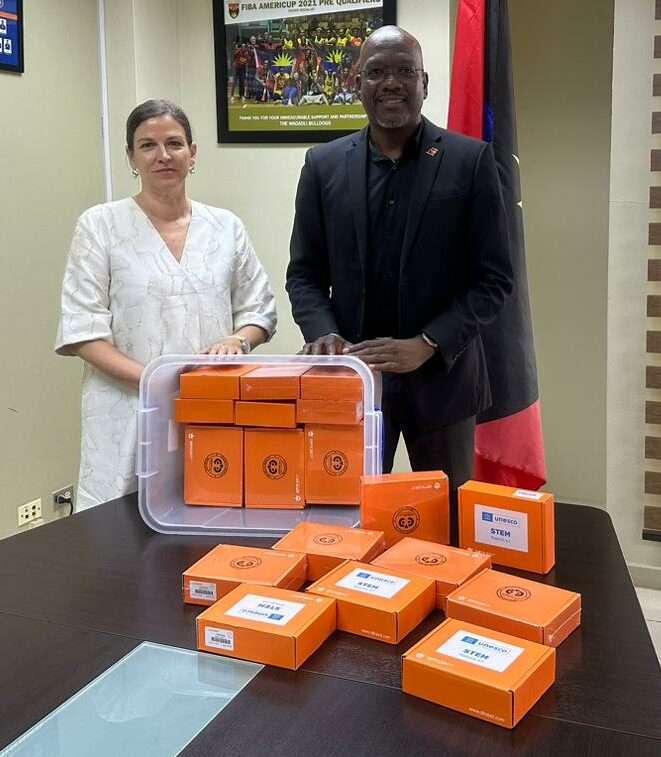
This week, the Ministry of Education is pleased to announce the timely donation of fifty (50) Robotic STEM Kits from the United Nations Educational, Scientific and Cultural Organization (UNESCO).
Ms. Ana Paolini, Director of the UNESCO Field Office for the Caribbean, presented the kits to the Ministry.
During the handover, Ms. Paolini noted that UNESCO would also provide technicians to offer training and support for the implementation of the STEM Robotic Kits. Dr. Reg Murphy, Secretary-General for the National Commission UNESCO Antigua and Barbuda, will assist with the STEM education training.

Minister Daryll Matthew emphasized the importance of STEM education in Antigua and Barbuda and advocated for integrating artificial intelligence (AI) and other technological advancements into the education system.
With the support of on-island technical training and by investing in professional development for educators, he aims to improve the quality of STEM instruction in schools. “Well-trained teachers can inspire students and foster their interest in science, technology, engineering, and mathematics,” he remarked.
UNESCO’s Commitment to STEM: As the UNESCO Representative for several Caribbean countries, including Antigua and Barbuda, Jamaica, and Trinidad and Tobago, Dr. Paolini advocates for STEM education. UNESCO recognizes the importance of STEM disciplines in fostering innovation, economic growth, and sustainable development.
Given her experience in urban and territorial engineering, Dr. Paolini emphasizes the integration of technology into education. This involves promoting digital literacy, encouraging the use of educational technology, and supporting initiatives that enhance STEM learning experiences.
This story was first published by Antigua News on : antigua.news/2024/06/02/unesco-donates-50-robotic-stem-kits-to-antigua-and-barbudas-education-ministry-to-boost-innovation-in-schools. © 2024 Antigua News. Republication without permission is not allowed.

About the author
The Editorial Staff refers to all reporters employed by Antigua.news. When an article is not an original creation of Antigua.news—such as when it is based on a press release, other media articles, letters to the editor, or court decisions—one of our staff members is responsible for overseeing its publication.
Read our editorial standards and corrections policy. Spotted an error? Contact the newsroom.
More from Antigua and Barbuda
View section
Emergency Response Teams to Stage Mass Casualty Drill at Scotts Hill Ahead of CHOGM
Emergency personnel will simulate a serious vehicle crash to test hospital readiness, while a separate evacuation exercise is planned for the CHOGM opening ceremony venue.
By Cory Wayland

Karim Edwards’ Trial Over Fatal Friars Hill Road Crash Postponed Until December
More than four years after the collision that claimed the life of medical student Kenneth Mathew and left Priyanjana Das with life-altering injuries, the accused driver is still awaiting trial.
By Cory Wayland

Jury Rejects Self-Defence Claim And Finds Kareem Simon Guilty Of Dennis Edwards’ Murder
Jury rejects Simon’s self-defence claim after video footage reveals details of the fatal confrontation on Lower All Saints Road.
By Cory Wayland

Tourism Ministry and ABTA Working with Bert Kirchner on Proposed Louis Tomlinson Campaign
Minister Michael Freeland has held talks on the project, which aims to turn international exposure into visitor interest and bookings.
By Shermain Bique-Charles
Comments
Be the first to comment.