
Turkish Billionaire buys Alfa Nero for $40M

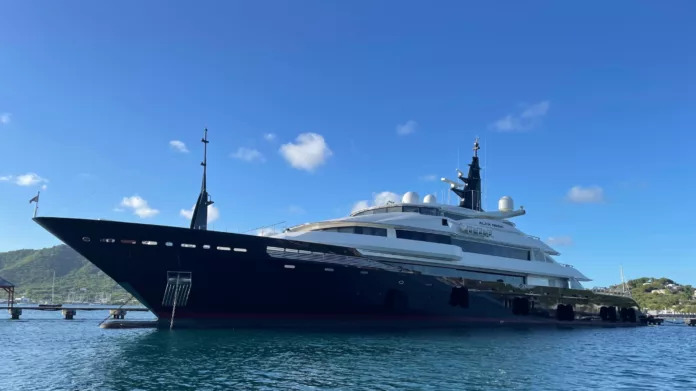
The Alfa Nero, a luxurious superyacht previously owned by the government, has finally been sold after a long period of unsuccessful attempts to find a buyer.
Prime Minister Browne confirmed in Parliament that a deposit has been made
According to our sources, the deposit was made by a Turkish billionaire with a net worth of approximately $155 billion. Our newsroom will publish the name of the buyer soon.
The yacht was sold for a total of US$40 million, with the sale being overseen by Port Manager Darwin Telemaque. The broker handling the sale is set to receive 4.5% of the sale price.
Prior to this successful sale, there were several legal challenges and setbacks. Former Google CEO Eric Schmidt initially won the bid to purchase the Alfa Nero but withdrew from the deal due to legal issues.

The yacht was then put up for auction and was sold for $67,000,677 after being declared abandoned by the government of Antigua and Barbuda.
Legal complications continued, with the government facing challenges from both a secondary party claiming ownership and the runner-up bidder, Warren Halle.
Halle alleged that the government breached an agreement to sell the vessel prior to the auction.
Despite these challenges, the sale was eventually completed through private treaty, with the government taking responsibility for all debts associated with the Alfa Nero.
The prime minister also addressed misconceptions, denying claims of exorbitant legal fees and commissions paid to local agents, stating that negotiations had led to reduced costs.
He further revealed that the new buyer has been given indemnification against future liability, providing clarity on the transaction’s terms and conditions.
This story was first published by Antigua News on July 18, 2024: antigua.news/2024/07/18/turkish-billionaire-buys-alfa-nero-for-40m. © 2024 Antigua News. Republication without permission is not allowed.

About the author
The Editorial Staff refers to all reporters employed by Antigua.news. When an article is not an original creation of Antigua.news—such as when it is based on a press release, other media articles, letters to the editor, or court decisions—one of our staff members is responsible for overseeing its publication.
Read our editorial standards and corrections policy. Spotted an error? Contact the newsroom.
More from Antigua and Barbuda
View section
Hundreds Caught In Miles-Long Gas Lines As Dealers Protest Increased Margins
Motorists are scrambling for fuel as leading service stations shut their pumps for the second time in weeks, while WIOC’s Friars Hill station reportedly remains the only WIOC location still dispensing gasoline.
By Cory Wayland

Four-Country CARICOM Free Movement Scheme Reports 939 Processed as Antigua Maintains Separate Conditions for TCN Transfers
Antigua and Barbuda remains outside the four-country scheme, while proposing strict limits and safeguards for temporary transfers of third-country nationals from the US.
By Shermain Bique-Charles

Elderly Man Found Dead Inside Ovals Home
Police are investigating after an elderly man was discovered unresponsive at his home in Ovals on Wednesday morning, with no indication of foul play at this stage.
By Cory Wayland

WATCH: Taxi Operators Call for Proper Policing as Minister Freeland Reviews Concerns in St. John’s
Taxi association representatives say vehicles occupying designated spaces and soliciting cruise passengers are affecting operations around Heritage Quay.
By Shermain Bique-Charles
Comments
Be the first to comment.