
Booby Alley Project to start by August

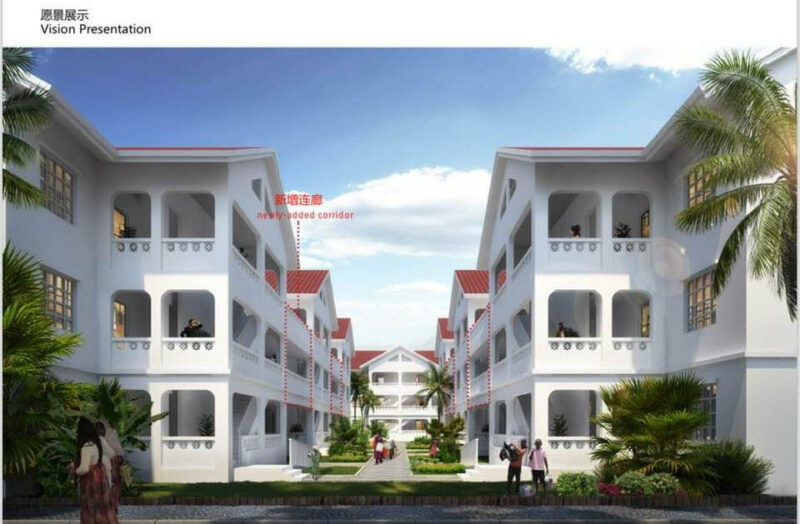
The Booby Alley housing project, which has been delayed for several years, is finally set to begin construction by August of this year.
Prime Minister Gaston Browne, the project has now been presented to the Tenders Board for the selection of a construction firm to carry out the work.
The selection process by the tenders board is expected to last for two months, with the final selection scheduled for June.
Once the contractors have been chosen, the actual construction work is expected to commence within a 60-day period.
The People’s Republic of China is financing the Booby Alley housing project, as well as a similar project in Mongo Town, as part of a $100 million grant.

The start of the project was initially delayed due to the COVID-19 pandemic and further delayed due to issues where some residents had refused to be relocated to enable the demolition or removal of homes in the heavily congested block of houses.
Following a stand-off with some residents, they finally agreed to vacate the premises, allowing for the construction of multi-story condominium-style homes for the residents of Booby Alley.
MP Browne stated that the housing project was necessary to ease congestion and improve the quality of homes for the residents.
He promised that the residents would have the opportunity to share their opinions on the homes during consultations planned for later.
Meanwhile, Michael Joseph, the ABLP Caretaker for the St. John’s Rural West constituency, has disclosed plans to implement a housing development at Yeptons.
He is requesting the Prime Minister’s assistance in raising the financing for the project. Phase One of the project will see the construction of around ninety homes, with additional homes to be built in later phases.
This story was first published by Antigua News on April 22, 2024: antigua.news/2024/04/22/booby-alley-project-to-start-by-august. © 2024 Antigua News. Republication without permission is not allowed.

About the author
The Editorial Staff refers to all reporters employed by Antigua.news. When an article is not an original creation of Antigua.news—such as when it is based on a press release, other media articles, letters to the editor, or court decisions—one of our staff members is responsible for overseeing its publication.
Read our editorial standards and corrections policy. Spotted an error? Contact the newsroom.
More from Antigua and Barbuda
View section
‘They Can’t Dictate That’: Freeland Rejects Player Pressure Over National Coach
Freeland defends the coaching staff and says players should demonstrate their value through training and performance.
By Shermain Bique-Charles

Search Ends as All Four Juveniles Who Escaped Bolans Police Station Return to Police Custody
Police apprehended three of the juveniles during a search operation in Liberta on Thursday morning, less than a day after the fourth surrendered to authorities.
By Cory Wayland

Farmers Given 90 Days to Plant as Government Launches 102-Acre Land-Clearing Programme
Antigua launches a 102-acre agricultural land-clearing programme requiring beneficiaries to establish viable crops within 90 days of land preparation.
By Cory Wayland

Freeland Blames Poor Player Commitment for Antigua and Barbuda’s Basketball Withdrawal
Basketball president acknowledges unpaid stipends but says repeated low practice attendance drove the decision to withdraw.
By Shermain Bique-Charles
Comments
Be the first to comment.