
ANTIGUA CRUISE PORT & DOMINO ASSOCIATION LAUNCHES WEEKLY SHOWDOWN GAMES

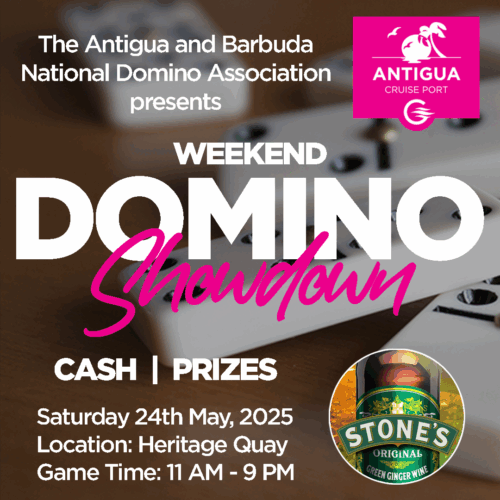
St. John’s, Antigua, May 23, 2025 – Domino tables are heating up in Heritage Quay and you don’t want to miss out on the competition! In a first-of-its-kind collaboration Antigua Cruise Port (ACP) and the Antigua and Barbuda National Domino Association (ABNDA) are rolling out “Domino Showdown Games” leading up to the World Domino Championships being hosted locally at St. Luce Conference Center from August 10 – 18, 2025.
Each week, the port will transform into a buzzing arena where local players and even curious travelers have a chance to connect and compete over vibrant music. Up for grabs are cash and prizes including up to $100 USD duty free shopping gift cards per match.
“We are very delighted to have the support of Antigua Cruise Port in strengthening the capacity for players of all ages – especially our youth as we warm up for World Championships,” said Ms. Carol-Faye Bynoe – President of ABNDA

She continued: “This partnership isn’t just about dominoes – it’s a win-win for community, culture and tourism. We’re proudly amplifying local talent in this strategic game and giving players a chance to be seen, to grow and represent Antigua and Barbuda on a global stage. The energy around these weekly showdowns will also definitely bring amazing vibes to St John’s”
The first Domino Showdown kicks off on Saturday 24th May, 2025 from 11:00 AM until 9:00 PM in Heritage Quay. Players can compete at different tables by skill levels, either solo or teams, with entry fees starting at just $1 XCD per player. Winners have the chance to double their registration fee at the end of each game.
Whether you’re a seasoned pro or just looking for some fun, everyone is welcome to join the weekly showdown. Come feel the vibes, make your moves and be part of the action at Antigua Cruise Port.
This story was first published by Antigua News on : antigua.news/2025/05/23/antigua-cruise-port-domino-association-launches-weekly-showdown-games. © 2025 Antigua News. Republication without permission is not allowed.

About the author
The Editorial Staff refers to all reporters employed by Antigua.news. When an article is not an original creation of Antigua.news—such as when it is based on a press release, other media articles, letters to the editor, or court decisions—one of our staff members is responsible for overseeing its publication.
Read our editorial standards and corrections policy. Spotted an error? Contact the newsroom.
More from Antigua and Barbuda
View section
Senator Colin O’Neal Earns Political Science Degree at UWI Five Islands, Sets Sights on Law Degree
Senator Colin O’Neal graduates with a Bachelor’s Degree in Political Science from UWI Five Islands Campus and announces plans to pursue a law degree in 2027.
By Cory Wayland

Young Man Suffers Minor Scrapes After Leg Gets Trapped in St. John’s Sidewalk Grating
The incident raises fresh concerns about pedestrian safety following similar occurrences in the city.
By Cory Wayland

Mighty Sparrow’s National Funeral Set for October 16 as Trinidad and Tobago Prepares Grand Farewell
Two days of public viewing and a grand cultural procession will precede the October 16 Celebration of Life honouring the legendary entertainer whose music helped shape Caribbean culture.
By Cory Wayland

Antigua and Barbuda Art Week 2026 to Bring Folklore and Creativity to Life with Exciting New Experiences
From the legendary Jam Bull to evening gallery tours, live painting battles and interactive workshops, this year's Art Week promises an immersive celebration of Antigua and Barbuda's artistic and cultural heritage.
By Cory Wayland
Comments (2)
Juju Bee May 23, 2025, 10:59 AM
Unruly One May 24, 2025, 9:06 AM